From first stroke to certificate
Install, connect, and draw as you always do. Sigan captures the rest.
Install the recorder
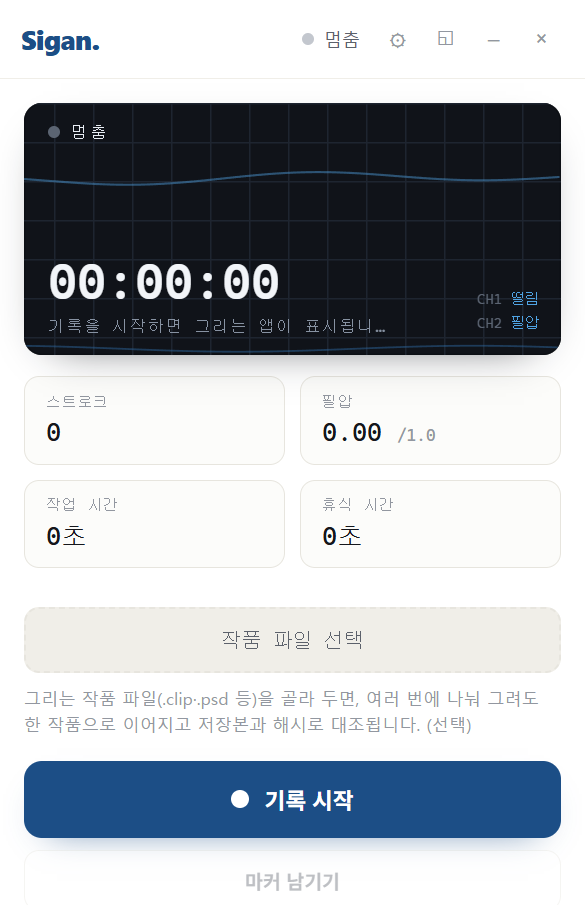
Download the Windows recorder and run it. No administrator rights are required.
Connect to the web
In Settings, click “Connect to web” — a browser opens. Log in and approve once. There are no codes to type.
Pick your artwork file (optional)
Choose the file you're drawing (.clip, .psd, etc.) so multiple sessions join into one work and get hash-matched to your saved file.
Record, then draw as usual
Click Record and draw normally in your app. Only pen signals are captured — never keystrokes, nor anything outside the drawing app.
Mark the key moments
Leave markers for moments like composition, rough, or color. Each can include the screen at that moment, so you can look back on the process.
Save, and it's issued
Save in your drawing app; the record uploads automatically and a certificate with a public verification link is issued.
Prove it with a link
Share the verification link or QR. Anyone can view the replay, the signals from your hand, and the work timeline — no login required.
What we record, and what we don't
Only the coordinates, pressure, tilt, and timing of your pen while drawing. We never read your keyboard, nor capture your screen or anything outside the drawing app.